Why AI upskilling is harder than it looks and what research teams can do about it

Almost every company is trying to use AI to work better and faster. So naturally, “AI upskilling” and AI training have landed on every team’s to-do list, research teams included. But before anyone can start working with AI like a pro, we first have to align on what AI upskilling actually means, which tasks it needs to cover, and which challenges come with it.
The problem is that there isn't one AI skill to learn. Working well with AI means, among other things, writing good prompts, directing and overseeing AI systems, checking the quality of what they produce, and knowing when not to use AI tools at all. All of that is happening in a field that reinvents itself every few weeks.
If I had to name the one skill that ties all of these together, it would be judgment. The big question is shifting from "how do I use this tool?" to "how do I judge this tool and the output it creates?"
Before we get into it, I want to make one thing clear: this isn't an anti-AI post. At UX studio, we use AI on a regular basis for research-related tasks, and we think it's worth the effort. But it's much easier to tackle problems when you know about them, and when you know which parts people and companies struggle with. So here's the honest picture of why AI upskilling is harder than it looks.
Why this isn't like learning Excel
New tools have changed the way we work before. Excel and Word, then cloud tools, and more recently remote meetings all reshaped how we work. But those were tools you used: you carried out every step yourself, and the tool did exactly that, nothing more.
You could check every step along the way. If a number looked off, you opened the formula, traced it back, and found where things went wrong. If the bold button didn't work in Word, you would notice right away: the text simply wouldn't turn bold. The results were predictable as well. Everyone knew what to expect, and learning the tool meant learning a fixed set of steps.
AI, compared to this, works differently. You don’t use it step by step, you tell it what you want, and it takes care of all the little steps in between, often getting you the same result or even more. It behaves less like a tool and more like an intern or an assistant: one that answers confidently, produces a lot of content very quickly, and is sometimes simply wrong. Unlike a spreadsheet, it's a black box. You see the results or outputs quickly, but not how it got there.*
* Unless you ask it directly for its reasoning.
Because of that, it's hard to see when and why it fails. It might skip the report you attached and answer anyway, filling the gaps with something it made up. The result can still look convincing. Since AI is based on probabilities, it's also hard to get the exact same output twice. There's no fixed set of steps to learn anymore.
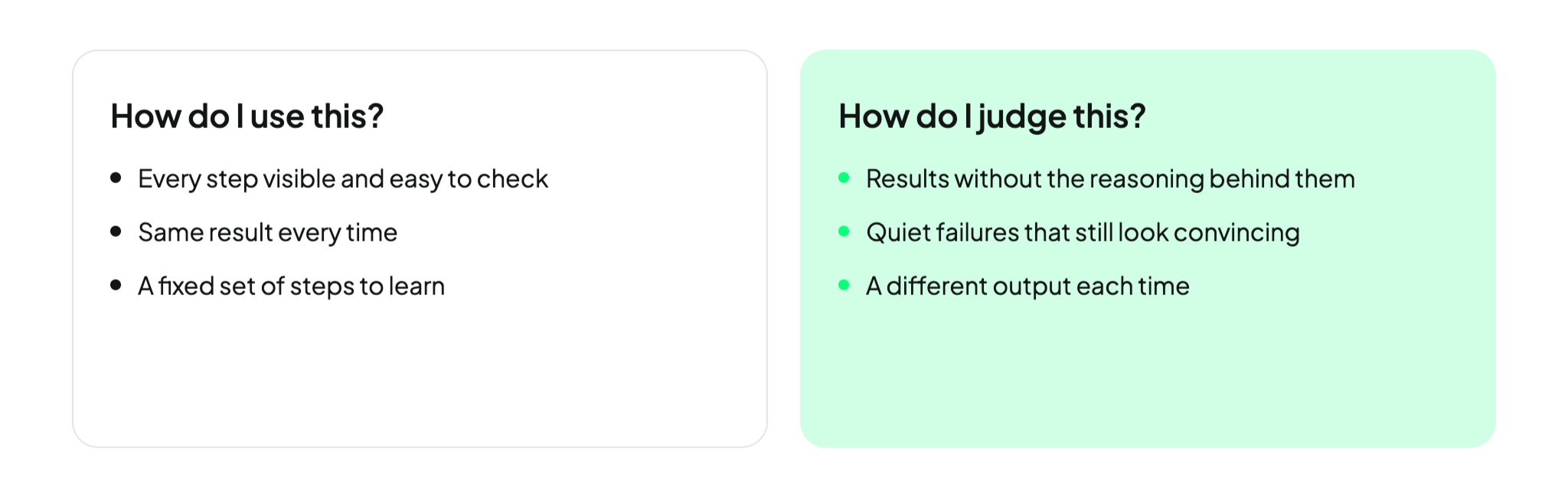
What's left is judgment. What in this output actually matters? What should I keep, and what should I throw away? Without that judgment, teams end up producing more so-called "AI slop": generic, unchecked content that looks polished. The term has become so common that Merriam-Webster named "slop" its 2025 Word of the Year, defining it as low-quality digital content, usually produced in large quantities by AI. (Merriam-Webster)
This is already a real cost at work. In a 2025 survey by BetterUp Labs and the Stanford Social Media Lab, 40% of US desk workers said they had received AI-generated "workslop" from a colleague in the past month. Each case took almost two hours to deal with, and around half of the people who received it saw the sender as less capable and reliable afterward. (BetterUp)
That’s why the most important skill when it comes to AI is remembering that you’re in charge. AI should work within your guidance and your framework, not the other way around.
Researchers actually have a head start here. Questioning sources, checking evidence, and spotting what's missing are already at the core of our job. Still, building that judgment across a whole team is harder than it sounds, for three reasons.
Why judgment is hard to learn
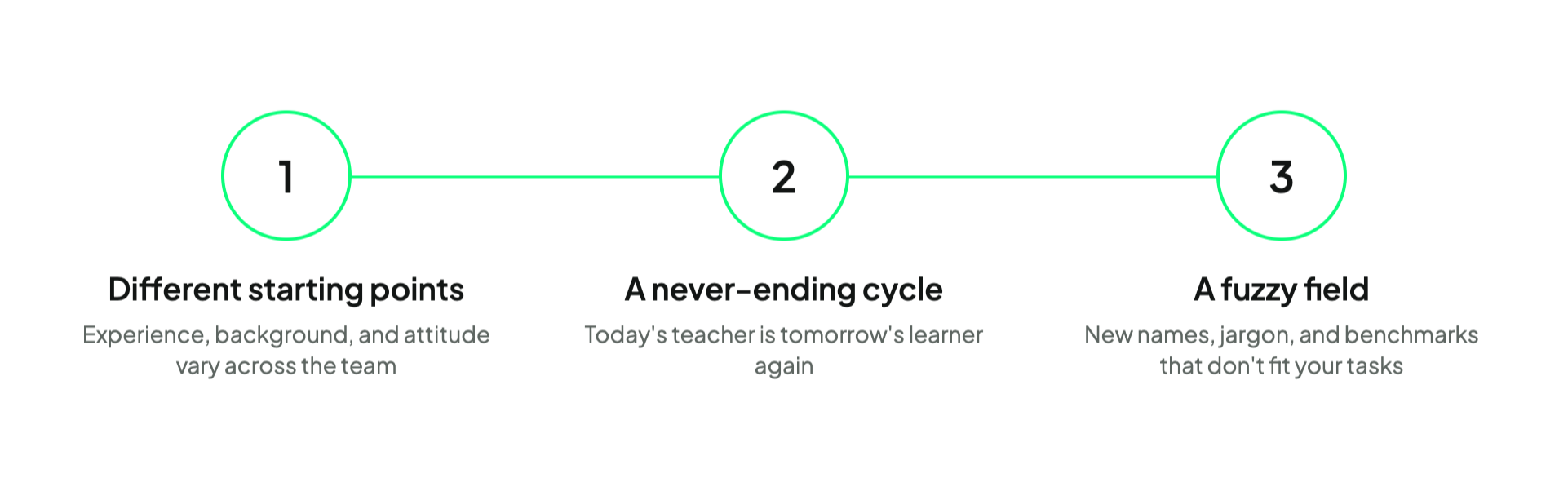
Challenge 1: Everyone starts from a different place
In most teams, AI experience is all over the place. Some colleagues use AI every day. Others have barely tried it.
Beyond that, backgrounds vary, too. Researchers, designers, and marketers all come to AI differently and often need different AI tools for their work. Most of them aren't technical people, and their jobs never required them to be, yet suddenly they're expected to design prompts, build agents, and manage systems they never had to manage before. Even GitHub, once firmly a developer's space, is now part of their world.
Attitudes vary just as much. Some people have real concerns about privacy, quality, or how AI changes their role. On top of that, before they can even try it out, they first need to understand AI's limitations and learn to be careful about what they share with it, from confidential company data to personal data. That can be a real bummer for anyone's (maybe non-existent) excitement to learn.
On the other hand, some people trust AI a little too much. They take its answers at face value and skip the healthy skepticism they need to evaluate what it produces.
Good upskilling has to meet people where they are, with all their different levels of experience, backgrounds, and attitudes. The goal is the same for everyone: don't over-trust AI, but don't be afraid of it either. Just know how to judge it and use the right steps to minimize errors. That's hard to do with a single AI training session that's too basic for some people and overwhelming for others.
Challenge 2: From learning to teaching, a never-ending cycle
AI is constantly changing. The state of the art can shift from one week to the next. One model is the go-to for months, then a competitor releases something new and the recommendations shift.
That puts everyone in the role of the learner, including the people who are supposed to teach it.
From the learning perspective, it's a lot. Keeping up with constant change next to your regular tasks can be overwhelming, and it's easy to feel like you're always behind. It takes effort to stay open-minded and not get frustrated, especially when it comes to tasks you've done comfortably by hand for years.
From the teaching perspective, it's no easier. Whoever teaches has to explain AI in simple terms to people with very different backgrounds, knowing their advice might be outdated in a few weeks. In most companies, that person is a colleague, not a full-time trainer, so all of this happens on top of their own job. Because the field keeps moving, they have to keep upskilling themselves, too.
Today's teacher is tomorrow's learner again, in a cycle that never really ends.
Challenge 3: A fuzzy field: hard to know what you actually need to know
Staying up to date is hard enough. But even when you do find time to learn, it's not always clear what exactly you're learning.
It starts with the names. The same thing might be called a "Skill" in Claude, a "Gem" in Gemini, or a "custom GPT" in ChatGPT. Then come the technical terms, from prompting and MCP connectors to agents, RAG, and agentic AI. Each one sounds important, and it can feel like learning a completely new (programming) language.
As I wrote in my post about building my first AI agent, people use terms like agent, AI, skill, and chatbot interchangeably to mean different things, and sometimes enterprises are guilty of it as well. We ran into the same thing in our own team: agents vs. skills vs. the AI tools built into our workspace.
Even the information itself is hard to rely on. Benchmarks, for example, compare AI models on standardized test tasks, but those tasks are rarely the ones you actually do. A model that tops a ranking for coding or math tells you very little about how well it summarizes your interview notes.
The good part is that nobody needs to master all of it. A handful of basics goes a long way. The tricky part is knowing which handful matters for your work, and that's rarely obvious at first.
Judgment includes knowing when (not) to use AI
Today there's an AI tutorial or ready-made skill for almost every office task, from replying to emails to pretty much every step of the research workflow. It can feel like every task now has an AI shortcut waiting for it.
But AI isn't automatically the faster option. Looking for the perfect AI solution, tweaking the prompt again and again, and then fixing the result can easily take longer than doing the task yourself. Whether AI or your own hands are the easier route depends on the task and on how you personally like to work. (We've written about when an AI assistant is enough and when you need a dedicated UX researcher, and we tested it hands-on in Can AI take over usability testing?).
There's a second, quieter cost, too. A professor of human factors once told me in the context of automation technology: "use it or lose it." If you hand a whole task over to AI every time, you stop practicing it. Writing clearly, summarizing, spotting patterns: AI is good at all of these, which makes it tempting to stop doing them yourself.
But eventually, you might end up thinking you can't do them without AI anymore.
As research from the University of Southern California shows, this feeling is real. In their 2026 experiment, people who simply copied AI-generated text into their work felt less confident doing the task without AI, felt less ownership of the result, and found the work less meaningful. The drop in confidence and meaning stayed even after they went back to working by hand. But when people used AI as a collaboration partner, writing their own draft first and then using AI to refine it, these effects didn't show. (Lee et al., 2026, Scientific Reports)
That's why AI upskilling also has to protect something less obvious: people's sense that their own work is valuable. A summary you wrote yourself, a slightly clumsy email, a first draft with rough edges. None of it is algorithmically polished, and it doesn't need to be.
Human work is not only enough, it's still needed as the base of creation.
This is something I try to keep in mind in my own work.
I’m very much pro AI. I use it every day to work more efficiently, and I'm actively building new skills around it: building AI agents, writing prompts and tasks that are easy to follow, and structuring my thinking so others (human or AI) can follow it too.
For research tasks, I mostly use it for proofreading, iterating on my ideas, and helping me get a first draft started. You can read here how we researchers use AI at UX studio.
For me, it's not only about AI upskilling. There's another side of the same coin: using AI to upskill yourself.
So I don't keep AI away from the skills I want to grow. Communicating with senior stakeholders, especially in stressful moments, and writing emails that are clear and easy to understand are skills I'm still working on. I don't want to hand them over, I want to get better at them myself, and I do use AI for that. But instead of asking it for the finished answer, I ask AI how I could make my own version better, and why. Asking for the reasoning is a big part of keeping the skill alive instead of handing it over.
With this, AI becomes a coach, not a ghostwriter.
AI upskilling is not a one-time achievement
There's no single AI skill to learn and no AI training that stays up to date forever. AI upskilling works best as an ongoing team habit, built around real work, shared judgment, and people who stay in charge and keep their own skills sharp.
Judgment can be learned, too. It grows like any other research skill: by drafting first and letting AI refine, by asking for the reasoning instead of just the answer, and by reviewing AI outputs together until the whole team knows what “good” looks like.
Keeping these challenges in mind, is also how we approach AI upskilling with research teams. We start by “diagnosing” their real research workflows, look at where AI can genuinely help and where it shouldn’t be involved, and adapt to the tools they already use. We follow the AI landscape closely, so teams don’t have to track every new model next to their actual work.
In the end, despite all these challenges, it’s worth it. When people know how to use AI in their own daily workflow, it really does make work more efficient. It can even make it more fun and more enriching. So try it out.
Want to find out where AI fits into your team’s research work?
Get in touch about our Applied AI for research consultancy.