How to prototype with AI as a Product Manager


Can a first-draft AI prototype be trusted to guide a product decision? It's a question more product managers are facing as AI prototyping becomes part of their workflow. More PMs are using AI tools to turn early ideas into clickable prototypes themselves, without having to wait for a designer or engineer to create the first version, which makes it fast to try ideas and get feedback early.
The problem is that a raw first output is easy to mistake for something that has already been thought through. It gets handed to engineering before the team has agreed on what the prototype is meant to demonstrate, and the team ends up rebuilding it from scratch weeks after.
This guide covers how to prototype with AI the right way: how finished a prototype needs to be, how detailed your prompts should be, how to give feedback, and where AI prototyping stops being reliable.
What is AI prototyping, and why does it matter for product managers?
AI prototyping is the process of using AI tools to turn an idea or product requirement into an interactive prototype. Instead of waiting for a designer or engineer to build a first version, a product manager can generate one directly and use it to explore ideas, gather feedback, or test a change.
The speed is the appeal, and also the risk: a fast result tells you nothing about how much to trust it. The rest of this guide is built around that gap. If you're new to prototyping itself, our overview of prototyping is a good starting point.
How to prototype with AI the right way, in five steps:
- Decide how finished the prototype needs to be before you open any tool.
- Match the detail of your prompts to that level of finish.
- Refine in small steps, one component at a time, with a design system underneath.
- Work in small batches and review the output with your team.
- Know when to stop prompting, switch to manual work, or bring in outside expertise.
How finished does an AI prototype need to be?
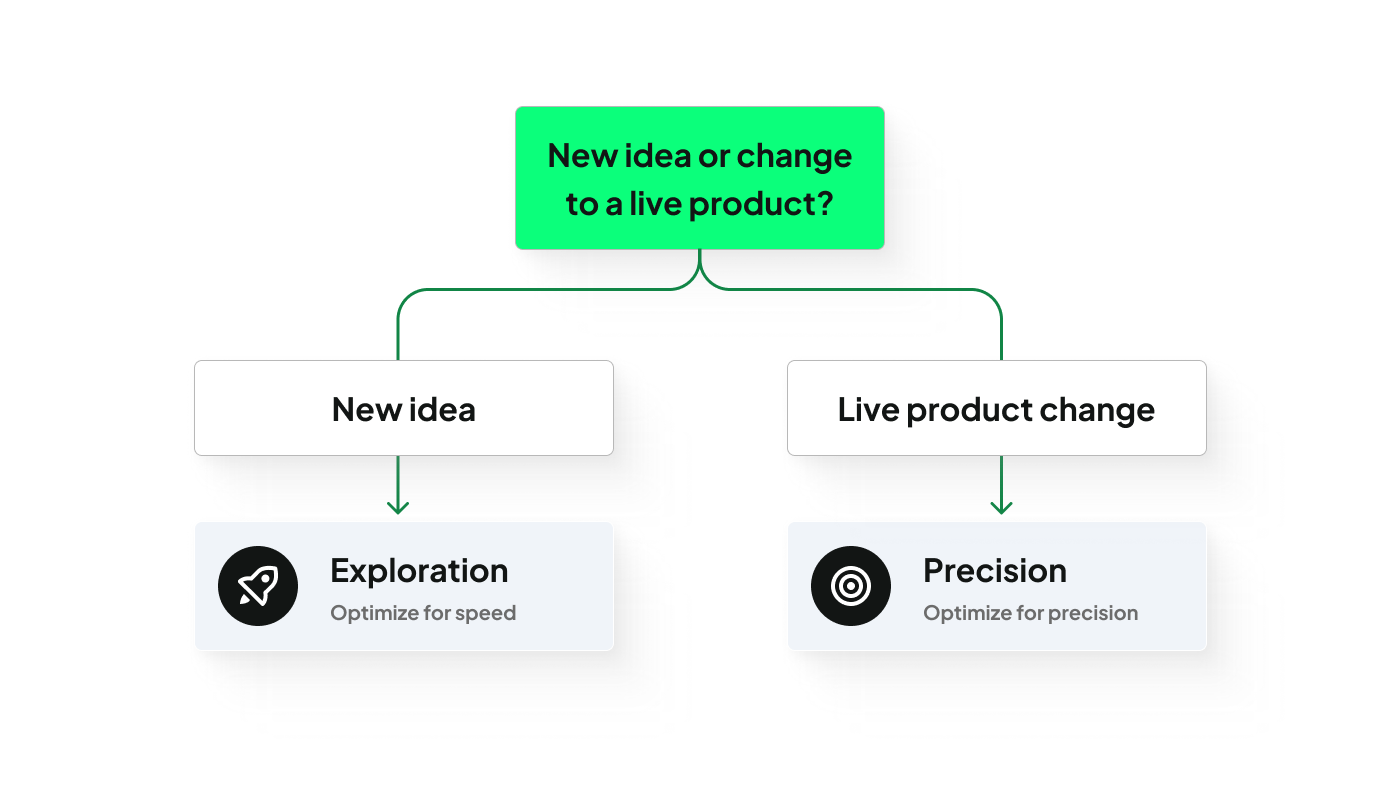
It depends on the decision you want the prototype to support. If you're exploring a new idea, choose speed over visual polish. If you're testing a change to a live product that customers already rely on, prioritize precision, even if it takes longer. Decide this before opening any AI tool.
Most AI prototypes fall somewhere between two approaches, depending on what you're trying to validate. Which one you need is determined by where you are in the process and how mature the product is. When teams skip this decision, a quick exploration prototype gets treated as finished, and that is how a team ends up needing a full rebuild later.
What this looks like in practice
One of our designers moved from a quick prototype to a real proof of concept, built with the same AI coding tool. The first prototype was basic by design, and that was fine because nobody was making a big decision based on it. The proof of concept was a different job entirely: it took about a week because the point was testing whether the idea held up under real use.
A UX researcher on our team picked up on vibe coding when an urgent priority came up on a client project and the design team's capacity was already booked. Before opening any AI tool, she gathered context, reviewed previous redesign recommendations, and planned the flow and the elements she wanted. With the scope already defined, she created the first version in just 30 minutes and developed it into a complete concept by the end of the day. The team then reviewed the result and provided feedback.
How detailed should your AI prototyping prompts be?
Match prompt detail to fidelity. For exploration, keep prompts loose and generate several concepts at once. When accuracy matters, describe each component in detail. Specify colours using hex codes, define spacing in pixels, and provide reference screenshots to show what the result should look like. Concrete wording beats subjective wording.
Once you know which job your prototype is doing, the next thing that changes is how loose or exact the prompt needs to be.
You don't need design terminology to write good prompts
What changes how well a prompt lands is whether the language is concrete or subjective, not how much design vocabulary it uses. You don't need real design terminology to prototype well. That kind of language matters more once you're actually implementing something.
Subjective descriptions are where it gets frustrating, because AI doesn't always interpret them the way you'd expect. Instead of “make the layout feel less crowded”, attach a reference screenshot and say which component to change.
Make your prompts specific
Say you want to prototype a dashboard.
A vague prompt would be:
“Create a modern dashboard for a SaaS product with a clean and intuitive layout.”
Write instead:
“Create a desktop dashboard for a B2B SaaS product. Include a left-hand navigation bar, a summary section with three KPI cards, a line chart showing monthly activity, and a table of recent transactions. Use the attached screenshot as a visual reference. Keep the existing navigation and typography styles. Make the KPI cards clickable and allow users to filter the transaction table by date.”
The vague prompt leaves the AI to guess almost everything, so you get its interpretation of "modern" and "clean". The specific prompt gives it clear boundaries to build inside.
Here is what’s different about the second one:
- Context about the product
- The target audience and device
- Specific components
- Interaction requirement
- Visual references
- Constraints
How do you refine an AI prototype with feedback?
Give feedback in small steps instead of one long list. Start with the most critical issue, work one component at a time, and compare the output against a specific image of what you expected. Each round should ask for a smaller, more specific change, ideally with a design system underneath.
Dumping every issue into a single prompt doesn't work as well as tackling them one at a time. Working at the component level also makes a larger flow easier to get through, since most of what gets refined is one layout or interaction at a time anyway.
Step-by-step AI feedback process
- Start with whatever is most critical.
- Work on one component at a time instead of the whole screen.
- Compare what the AI produced against a specific image of what you expected.
- Ask for one smaller, more specific change per round.
- Repeat until the component is right, then move to the next one.
What should a team check before an AI prototype goes to engineering?
Review an AI-generated prototype with your team before it goes to engineering or stakeholders. Cover three areas: design (does the flow make sense), technical (is it feasible), and product (does the idea hold up).
Building a full concept with AI works best when you collaborate with others: gather feedback from designers, set up co-designing sessions, and review the output with the team. Skipping that step is how a prototype reaches an engineer or a customer before anyone has agreed on how finished it is.
The limits of prototyping with AI
AI prototyping has limits even with detailed prompts and a design system. Some changes are faster by hand: one change can take an hour of prompting but 15 minutes of dragging and adjusting directly. AI tools struggle with large requests, and complex, regulated products still need specialist research input.
Even with a robust design system and good feedback habits, there's a limit on how precisely AI can translate your specific creative vision, no matter how much detail goes into the prompt.
Some changes are faster to make than to describe
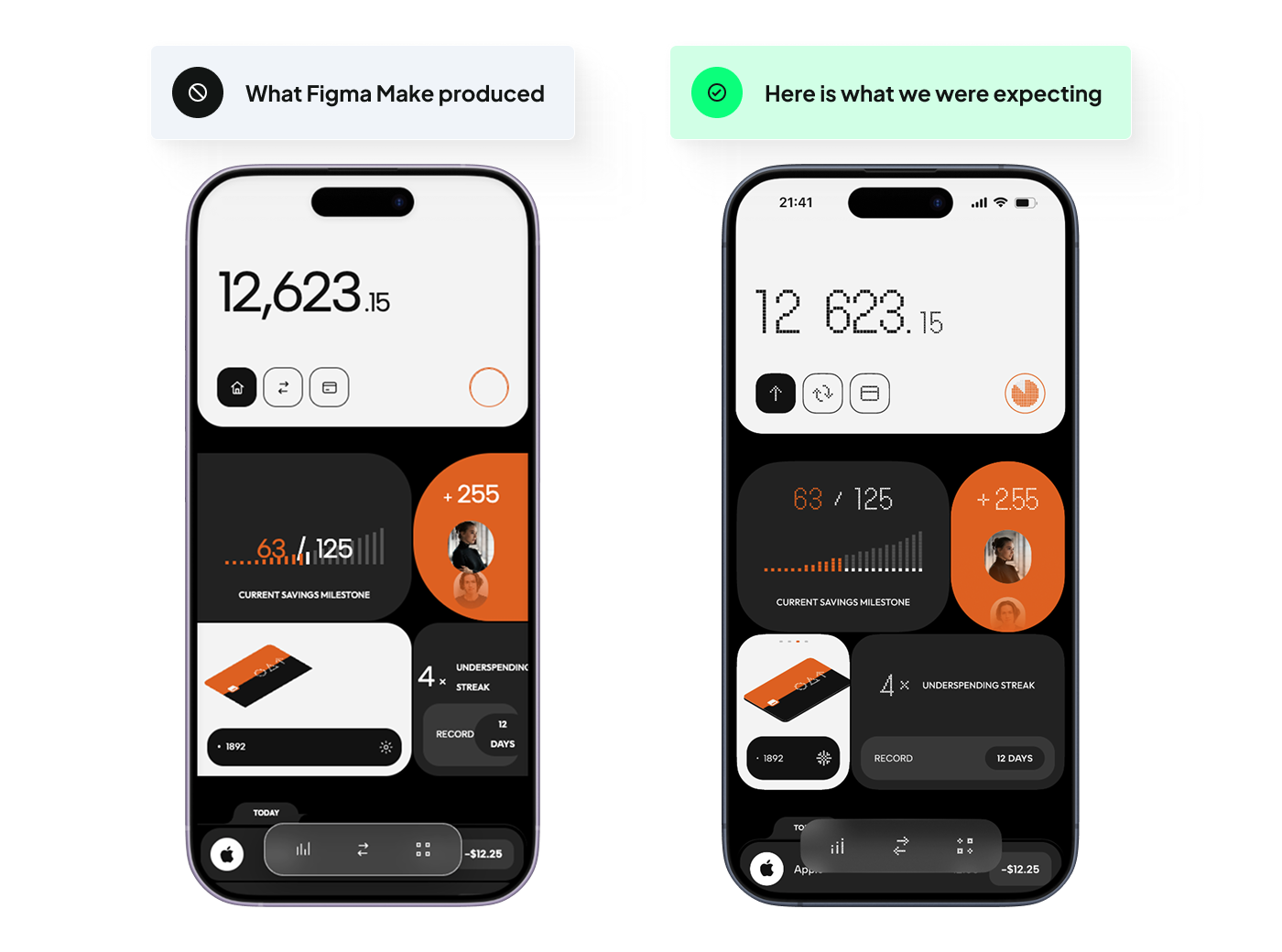
One of our product designers used Figma Make to add new elements to an existing screen. She had a clear picture in mind, shared all her other screens and references, and added lots of detail to the prompt. After multiple tries it still didn't produce the expected output, so she went back to designing it in Figma directly. Some things are still faster and more accurate to do by hand than to describe.
There is a human cost too. One of our designers described the tiredness after a long AI prompting session as something she'd never experienced in her design work, different from the usual kind of creative fatigue. Knowing when to stop and step back matters as much as knowing how to prompt well in the first place. In fact, knowing where AI is reliable and where it isn't is more important than getting better at prompting.
Key takeaways for product managers prototyping with AI
You can handle many early-stage prototyping tasks yourself with AI, as long as you keep these things in mind:
- Decide what you need to validate. Choose the appropriate level of fidelity before starting to prototype.
- Give AI clear direction. Use specific prompts, reference images and design systems, and refine the output in small steps.
- Know when to move beyond AI. Review prototypes with your team, switch to manual work when needed, and involve design and research experts when complexity increases.
If you need help building complex digital products, get in touch with our product experts. We can help with research, design and development, and we'll work out where your product sits on the complexity spectrum and what mix of the three would move it forward fastest.