Using AI in UX research: our honest take

For months, we explored how AI could support our research work. We did not test it in isolation or with pet projects. We used it in real projects, with real data, and real deadlines. We’ve written prompts, reviewed outputs, and compared results with what participants actually said.
Through this process, we learned an important thing. AI is not a shortcut to better research. It’s a tool that requires structure, context, and critical thinking.
In this post, we share what we learned, where AI works well, where it needs supervision, and how to use it responsibly in UX research today.
Our journey with AI
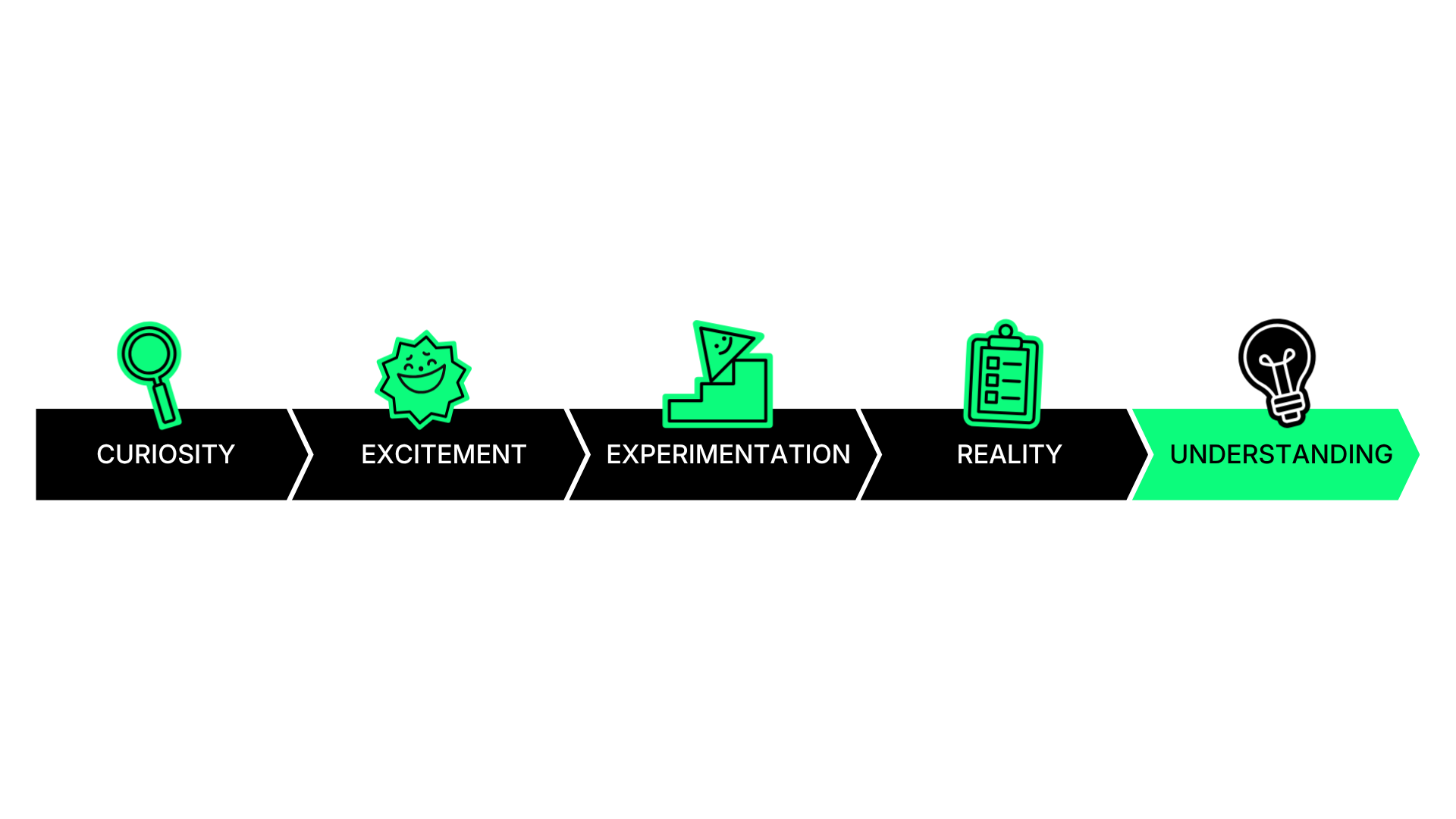
It started with curiosity. Then came excitement. And then, experimentation.
At UX studio, we’ve been exploring AI for a while now. We tested it. We challenged it. We wrote about it. We’ve explored it from many angles. We wrote about chatbot UI, prompt engineering, AI design patterns, and even tested whether AI can replace usability testing. We experimented with tools, features, and workflows across projects.
Our blog already reflects this journey, covering everything from AI principles to real-world experiments. But one question was in our mind for a while now: how does generative AI actually perform in real research work?
So we decided to go deeper. We tested its capabilities across real UX research tasks, with real data and real constraints. So, now in this post, we will introduce our experience as UX researchers using AI during our day-to-day work.
AI as part of our UXR work
We did not rely on a single experiment. We integrated AI into our daily research work over several months. We tested it across different activities, including research planning, interview preparation, surveys, analysis, and reporting.
We continuously improved our prompts and compared AI outputs with real data. We also discussed results as a team and documented patterns.
This helped us move beyond assumptions and build a shared understanding of what AI can and cannot do in practice.
What we learned first
AI is not a researcher.
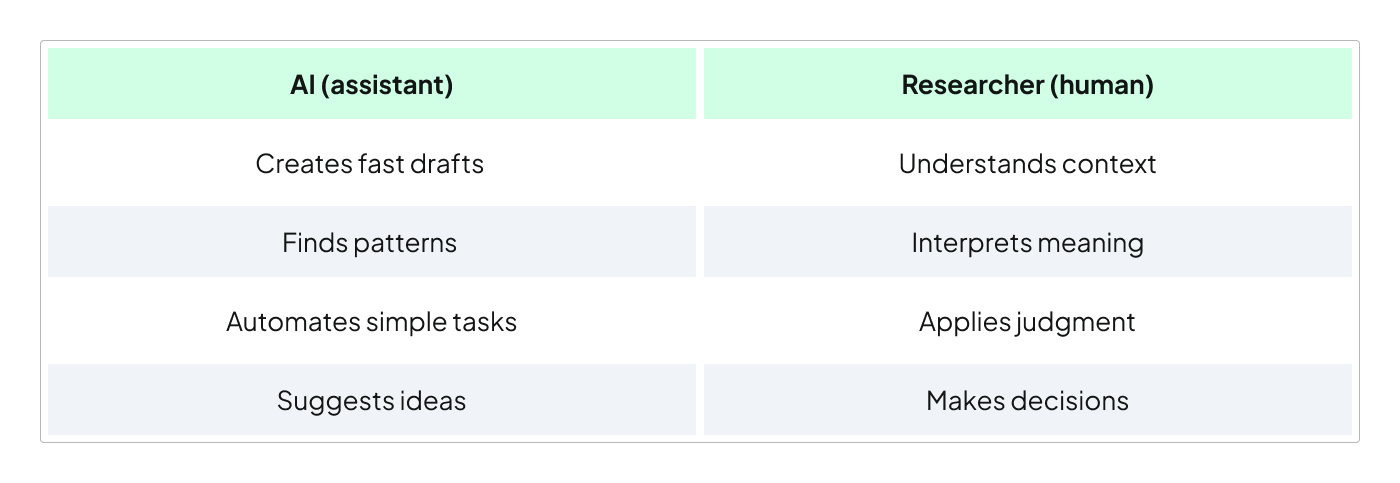
It’s a fast and helpful assistant. You can also think of it as a smart intern. It can create drafts quickly, suggest ideas, and identify patterns in text. However, it does not fully understand your users, your product, or your business context. It also does not know your research goals unless you clearly explain them.
Because of this, it can make confident mistakes. So, all in all, AI should support researchers, not replace them.
Where AI works well
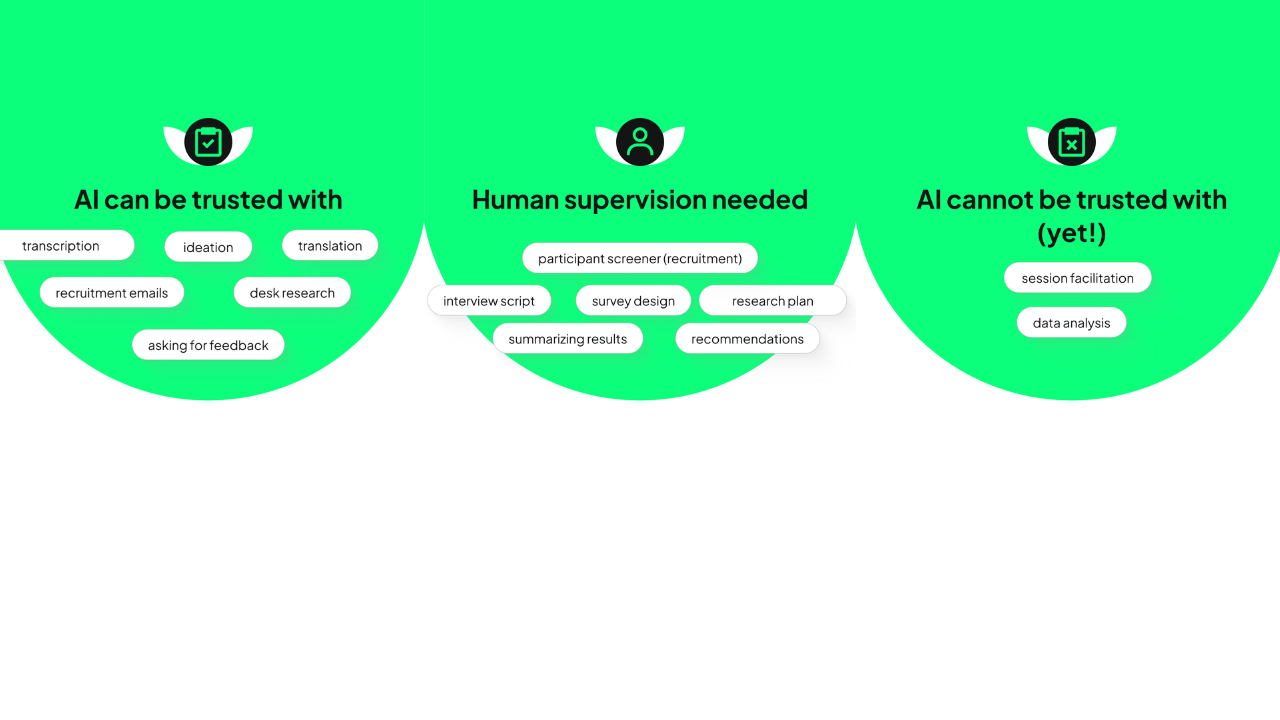
We identified several areas where AI performs reliably. These are typically tasks that are structured and easy to verify.
We, at this point of time, feel confident using AI for:
- transcription,
- recruitment emails,
- desk research,
- ideation,
- translation,
- and asking for feedback.
These tasks are low risk because the outputs are easy to review and correct. They also do not require deep interpretation or judgment.
In these cases, AI helps us save time without reducing quality.
Where AI needs supervision
We can also use AI in more complex research tasks. However, these always require professional review.
We used AI to support the creation of research plans, participant screeners, interview scripts, surveys, summaries, and recommendations.
AI can generate useful drafts, but the outputs are often imperfect. For example, AI may produce vague wording, introduce bias, misinterpret goals, or include incorrect details. In some cases, it even comes up with numbers or misquotes participants. Because of this, every output must be carefully reviewed and corrected before use.
With these tasks, we treat AI as a starting point, not a final answer.
Where we are still hesitant
There are also areas where we do not trust AI yet. These include session facilitation and data analysis.
Why facilitation does not work well
AI still lacks the human nuance needed for meaningful conversations. It often misses important follow-up questions, asks repetitive or irrelevant questions, and sounds impersonal.
This can make participants feel unheard and thus affect the quality of insights.
Why analysis is still risky
AI can summarize data, but it struggles with interpretation. It may group information incorrectly, overlook important signals, or draw conclusions that are not supported by the data. In our experience, AI-generated analysis often required significant correction. In some cases, fixing the output took more time than doing the analysis manually.
This makes it unreliable for independent use in research analysis.
What to pay attention to
If you use AI in research, there are a few key things to keep in mind.
1. Always keep a human in the loop
AI can suggest patterns and summaries, but it doesn’t fully understand your context. We recommend you to review and validate everything it produces. Always check whether the output reflects what participants actually said.

2. Watch for hallucinations
AI can generate information that looks correct but is not real. It may invent numbers, quotes, or insights. Because it presents information confidently, these errors can be easy to miss. You should always verify outputs against your original data.
3. Be aware of bias
AI is trained on large datasets that include biases and stereotypes. This means its outputs may reflect limited perspectives. You should always ask yourself whether certain groups or viewpoints are missing.
4. Be cautious of over-automation
Research is not just about summarizing information, but understanding meaning, context, and human behavior. AI cannot fully interpret emotions, tensions, or subtle signals. You should use AI to support your thinking, not replace it.
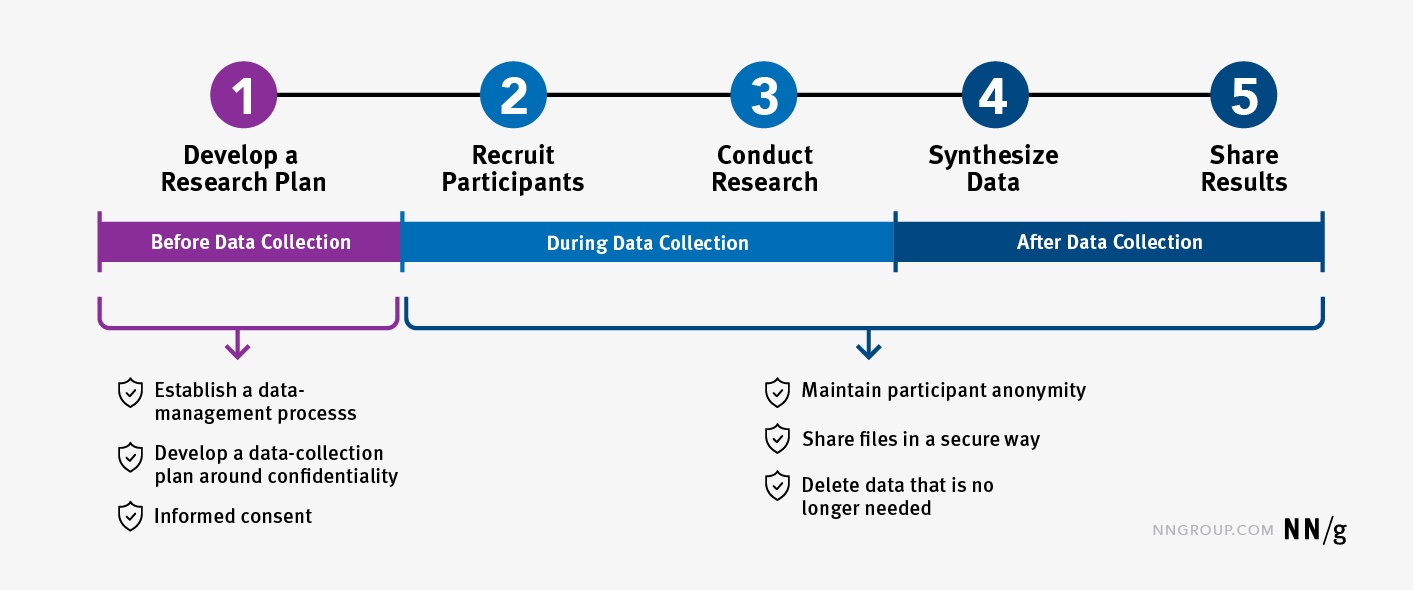
5. Protect participant data
You should never input personal or sensitive data into public AI tools. This includes names, emails, phone numbers, or any identifying information. Instead, you should anonymize your data and use participant IDs.
How to use generative AI in practice
Based on our experience, these practices worked best for our team.
1. Provide as much context as possible
AI performs better when it understands the situation. You should always include your research goal, target audience, relevant background, etc. The more context you provide, the more useful the output will be.
2. Structure your prompts
Better results don’t come from better AI tools. They come from better prompts. So, the biggest shift needn’t be technical but mental. AI is not an answer-machine. It’s a system that we need to guide with intention.
This idea is strongly supported by Kaleb Loosbrock, a Staff Researcher at Instacart and founder of the AIxUXR community. He describes working with AI as a “dance,” where researchers need to lead rather than follow. If we do not take that lead, AI will fill in the gaps on its own, and that is usually where quality starts to break down.
We saw this repeatedly in our own experiments. Even small changes in how we phrased a prompt could completely change the result. When we were vague, the output was vague. When we were specific, the output became more useful and aligned with our goals.
To make prompting more reliable, Kaleb introduced the CRAFTe framework, which gives a simple structure for guiding AI more effectively.
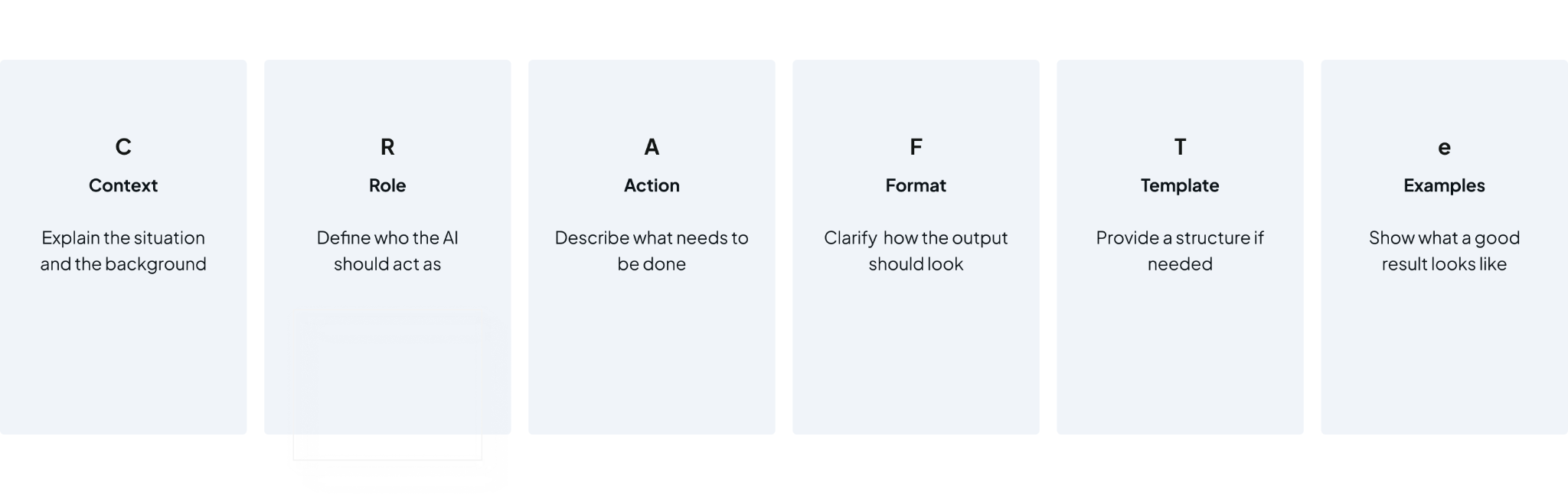
The core idea behind this framework is straightforward: the more clearly you define the task, the more precise the output becomes.
3. Create reusable templates
You do not need to start from scratch every time. Once you find a prompt that works, turn it into a template. This saves time and improves quality.
Example: Screener survey
Context: Recruiting people looking to buy a new computer.
Role: Act as a UX researcher writing a screener survey.
Action: Write screener questions to qualify or reject participants for this study.
Each question should:
- Be clearly phrased and easy to understand
- Include predefined answer options
- Specify which options qualify the participant
- Maintain a neutral and professional tone
Focus on key qualification dimensions:
- Buying intent and behavior
- Purchase timeframe
- Location
Format: Each question, and predefined answer options. Mark which answers qualify.
Template example:
Use this structure for any screener survey:
“Participant screener for [research topic]
1. [Eligibility question: behavior, timeframe, or intent]
Answer options:
- [Option 1]
- [Option 2]
- [Option 3]
Qualify if: [Option(s)]
2. [Demographic/location/language question]
Answer options:
- [Option 1]
- [Option 2]
- [Option 3]
Qualify if: [Option(s)]
3. [Behavioral question: recent or ongoing activity related to the topic]
Answer options:
- [Option 1]
- [Option 2]
- [Option 3]
Qualify if: [Option(s)]
4. [Attitudinal or contextual question]
Answer options:
- [Option 1]
- [Option 2]
- [Option 3]
Qualify if: [Option(s)]
5. [Optional disqualifier or segmentation question]
Answer options:
- [Option 1]
- [Option 2]
- [Option 3]
Qualify if: [Option(s)]”
You can add an example if you have any for a better outcome.
How templates can help
Templates make your work faster, more consistent and easier to review. They also reduce mistakes, because you won’t forget key instructions and (hopefully) get similar outputs every time. Think of templates as your “AI shortcuts”.
Pro tip
Save your best templates and build your own small library of research plan templates, interview script templates, survey templates, or summary templates. Over time, this library could become your personal AI toolkit.
4. Break tasks into smaller steps
You should avoid asking AI to do everything at once. Instead, break the work into smaller steps, such as summarizing, extracting themes, and then synthesizing insights. This makes the output easier to review and can improve quality.
5. Ask for explanations
You should not only ask for results. You should also ask the AI to explain its reasoning. This helps you understand how it reached a conclusion and makes it easier to spot errors.
6. AND MOST IMPORTANTLY: always review and validate
Before using any AI-generated content, you should check it carefully. You should verify accuracy, logic, and relevance. Whenever possible, you should also ask another researcher to review the output.

Key takeaways
AI is a valuable tool for research. However, at this point, it’s not a replacement for professional expertise.
After months of testing, we’ve learned that AI works best when tasks are structured and easy to verify. It becomes less reliable when nuance, context, and judgment are required. The biggest risk is over-relying on AI without proper review.The biggest opportunity is using it to speed up repetitive tasks and support thinking.
What’s next
In our work? We are continuing to experiment and learn.
And here, on our blog? We will keep sharing practical examples, lessons learned, and evolving best practices. Subscribe to get a monthly newsletter with our latest posts!
Credits
This blog post was written by Borbála German, UX researcher
Editing by Dr. Johanna Székelyhidi, marketing manager and copywriter